How Delta Lake Works Under the Hood
About a decade ago, we did data warehousing mainly in the traditional way using databases. While it was mature, reliable and fast, there were some well-known limitations. One of them was that the storage and compute are tightly coupled, meaning it got expensive while scaling up for massive workloads. Poor support for semi & unstructured data, rigid schema management, etc., are a few others.
The object storage platforms like S3, ADLS quickly became popular as the data storage became much cheaper than that of RDBMS platforms & we could store any kind of data formats - structured/semi-structured/unstructured.
Initially, these platforms were mainly used to stage & store all the raw data before the curated data goes into databases. This data could later be used to backfill downstream or for use cases like ML that needed raw data.
At this point, we couldn’t replace databases with these object storage platforms for data warehousing yet, because it lacked several critical DB features such as ACID guarantees, schema enforcement, updates/deletes, data versioning, and performance optimisations.
Delta Lake was the solution to this; it bridged this gap and made the data lake behave like databases in some ways.
The Core Architecture: Files & The Transaction Log
Delta Lake is not a magical new database server. It is an open source storage layer + table format that adds database-like features on top of a data lake. This was introduced by Databricks in 2017 & open-sourced in 2019.
We can use the delta format using Spark (native support - industry standard). In case you don't want to spin up a Spark cluster, the deltalake Python library (built on Rust) as well. The most common way to use it in industry is on Databricks.
When you create a Delta Lake table, the underlying data is stored in single or multiple Parquet files. Along with these parquet files that contain actual data, it also creates a transaction log as well.
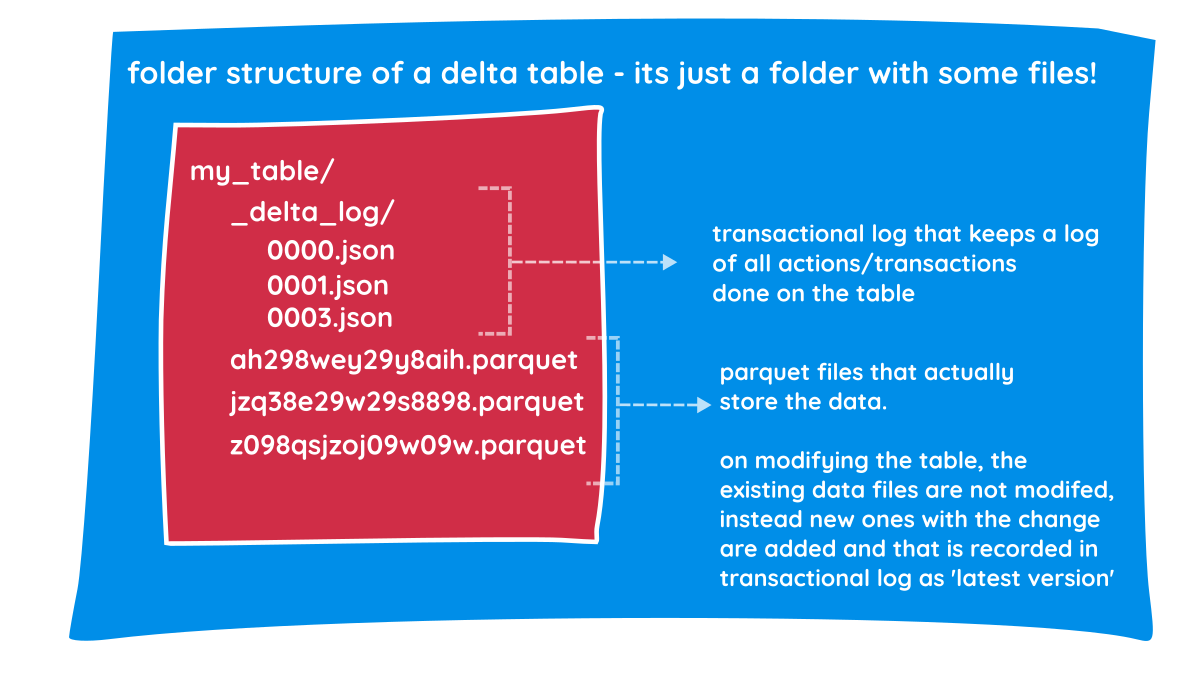
Transaction log
The transaction log is a set of JSON files that contains ordered records of every transaction performed on the table since its creation. Every time you perform any action on the delta table (like adding a column, deleting a row, or overwriting data), Delta Lake doesn't just change the files. It records that action in a JSON file inside the _delta_log directory. Along with actions performed on the table, it also captures predicates used, data files affected and some basic stats of the data.
Single source of truth
Every time you query the table, Spark checks this transaction log to retrieve the most recent version of the data.
Reading & Writing Data
It’s important to note that the storage (parquet files) are immutable, i.e. the parquet files that hold the data are never changed, only added. The change logs in the transaction log enable you to see the current version of the table. So the reader process and writer process can operate simultaneously without locking each other out, and this enables ACID guarantees.
The reader and writer processes in Delta Lake are governed by a multi-version concurrency control (MVCC) pattern. The writer process uses Optimistic Concurrency Control. This means a writer assumes no one else is changing the data it’s working on until the very last second. When a reader starts a query, it provides Snapshot Isolation. It sees a consistent "frozen" version of the data, even if writers are actively making changes.
Under the Hood: How Readers and Writers Never Clash
- There are two processes, the writer process & reader process.
- Once the writer process starts, it stores the delta lake table in, let's say, two data files (assuming data is not large) in a parquet format.
Lets say
file-1.parquet&file-2.parquet - As soon as the writer process finishes writing, it adds the transaction log
000.jsoninto the_delta_logdirectory. - A reader process always starts by reading the transaction log, & then reads the files.
- Next time, when the writer process wants to update a record which is present in
file-1.parquet, instead of updating the record in the file itself, it will make a copy of this file with the necessary updates. - It then updates the log by writing a new JSON file ->
001.json. Now, the log file knows thatfile-1.parquetis no longer needed. - When the writer & the reader processes are working simultaneously, they will never clash & as the reader will read the latest logs of only fully written data files.
- When any data file is added incompletely due to an error, it is not added into the log, therefore never read.
This mechanism guarantees ACID transactions on the delta table and thus lets us replace expensive databases with storage platforms for data warehousing.
-
Atomicity (All or Nothing) - As you noted, the data files are written before the JSON log is updated. For the Delta Lake, a transaction doesn't exist until the
000.jsonfile is successfully saved. The writer crashes after writingfile-1.parquet, but before writing the JSON log, the reader will never see that file. It’s as if the writing never happened. -
Consistency (No Corrupt States) - Delta enforces a schema before the write even starts (and validates it during the log commit), ensuring the table stays in a "healthy" state. The transaction log acts as a gatekeeper. If a writer tries to push a string into an integer column, the log entry will fail, preventing the "folder of files" from becoming a "data swamp."
-
Isolation (No Clashing) - Since the writer never modifies
file-1.parquet(it only createsfile-1_new.parquet), the reader can keep reading the old version peacefully. Even if 100 people are reading the table while you are writing, they are all looking at the "Snapshot" defined by the last successful JSON log. -
Durability (Data is Safe) - Because both the data and the JSON logs are stored in distributed cloud storage, the system can survive a total compute failure. If your Spark cluster explodes a millisecond after the log is written, the data is still there and correct.
Basic Working
We can create an empty table (delta) using SQL like below in Databricks ->
SQL
CREATE TABLE table_name (
    col-1 dtype,
    col-2 dtype,
    col-3 dtype...
) USING DELTA -- (optional)
Delta Lake is the default format in Databricks. We can view metadata of the table by - DESCRIBE DETAIL table_name
We can view the history of transactions on the table by - DESCRIBE HISTORY table_name
Advanced Delta Features
Time Travel & Rollbacks
Since we are not changing the underlying data files, every operation on the table is automatically versioned, which provides a full audit trail of all changes. DESCRIBE HISTORY function can be used to view it.
We can query older versions of the table. This can be done by
- TIMESTAMP method
- VERSION method
We can do rollbacks in case of bad writes.
Compaction & Z-Ordering (OPTIMIZE)
In big data environments like S3 or ADLS, opening a file has a fixed performance overhead. Imagine if a query needs to read 1 GB of data spread across 10,000 files, the engine would spend more time opening and closing files than actually reading data, causing a performance bottleneck. The swamp of files is usually caused by frequent streaming writes, high-parallelism jobs, or over-partitioning.
We can compact small files to improve the speed of reading queries from a table.
OPTIMIZE table_nameoptimises by compacting several small files into larger ones. It scans the table to find these tiny, fragmented files. It rewrites them into larger, contiguous Parquet files (ideally around 1 GB each). It updates the Transaction Log to point to the new large files and marks the small ones as "removed."
OPTIMIZE table_name ZORDER BY col_nameWhile OPTIMIZE cleans up the file count, ZORDER organises the data inside those files. Think of it as a logical index that co-locates related information. This helps by enabling Data Skipping. Delta Lake can look at the metadata of a file and say, "I know the CustomerID I'm looking for isn't in this file," allowing it to skip reading the file entirely.
Garbage Collection (VACUUM)
To maintain the Time Travel feature, Delta Lake does not immediately delete files after an update or delete. Even if a file is marked as removed in the latest version of the transaction log, it remains in your S3 or ADLS bucket so that you can still query the table as it existed in the past. Eventually, these files can lead to massive storage costs. That is where the VACUUM command comes in.
We can clean up unused files
- uncommitted files
- unused files
that are no longer in the latest table state.
We can do this garbage collection using -> VACUUM table-name [retention period]
Once you run vacuum on the delta table, you lose the ability to time-travel to a version older than the retention period.
Crucial concepts
Schema Enforcement and Evolution
In a standard data lake, a file with an extra column or a changed data type of an existing column can crash/fail the downstream process (pipelines/reports) or corrupt the dataset.
With Delta Lake, by default, if the writer process tries to write data with columns that do not exist or tries to change any existing column’s data type, the transaction fails immediately. This ensures the gold/curated tables stay clean and safe. So, the schema is enforced by default.
There might be scenarios where the schema change or any such upstream change might be legitimately needed. For example, adding a discount_code column. In traditional data warehouses, you’d need to recreate the entire table, but with Delta, you use .option("mergeSchema", "true"). Delta updates the metadata in the _delta_log to include the new column, and all existing rows simply show NULL for that new field.
Data Skipping (Min/Max Stats)
This is a huge performance booster. Every time Delta writes a parquet file, it scans and stores the minimum and maximum values for the first 32 columns in the transaction log.
So if you run SELECT * FROM sales WHERE price > 500, the reader doesn't start by scanning files. It reads the Transaction Log first. If the log says File_A has a price range of 10 to 100, Delta skips it entirely without even opening it. This is called Data Skipping.
On large datasets, this "metadata-only" check can eliminate 90% of physical I/O, making a data lake feel as fast as an indexed SQL database.
Interview Questions
Because Delta Lake has become the backbone of modern data engineering, these concepts come up constantly in interviews. Here are a few intermediate-to-advanced questions you should be prepared for:
- "What happens when two separate Spark clusters try to update the exact same Delta table simultaneously?"
- "How would you design a pipeline to handle a GDPR 'Right to Be Forgotten' request (hard delete), keeping Time Travel in mind?"
- "You have a streaming pipeline writing to a Delta table 24/7, resulting in thousands of tiny files, but users need fast read performance during the day. How do you tune this?"
- "How do you handle upstream schema drift (e.g., changing an INT column to a STRING) using Delta's
MERGE INTO?"
TL;DR / Summary
Delta Lake solves the unreliability of traditional data lakes by adding a transaction log (_delta_log) on top of standard Parquet files.
- It provides ACID transactions (readers and writers don't clash).
- It allows for Time Travel and easy rollbacks.
- It solves the small-file bottleneck with OPTIMIZE and Z-Ordering.
- It safely handles changing data structures via Schema Evolution.
By combining the cheap storage of an S3/ADLS data lake with the reliability of an RDBMS, Delta Lake has completely transformed how we build modern data platforms.