How Apache Spark Works Under the Hood (Explained Simply)
Writing and using Spark today has become incredibly accessible. Having said that, there’s a massive difference between writing Spark code that runs and code that scales. It’s tempting to treat Spark like a standard Python script when you're a beginner, but understanding how Spark works under the hood will help you write much more performant code and manage your cloud bills better.
If you are:
- A beginner in Spark wanting to understand how it works.
- A data engineer looking to enhance your understanding of Spark internals.
- Frustrated by the redundant, shallow information on this topic everywhere.
You’ve come to the right place.
The Core Components of a Spark Cluster
Before we start looking at how Spark works, it’s important to understand some the hardware level concepts.
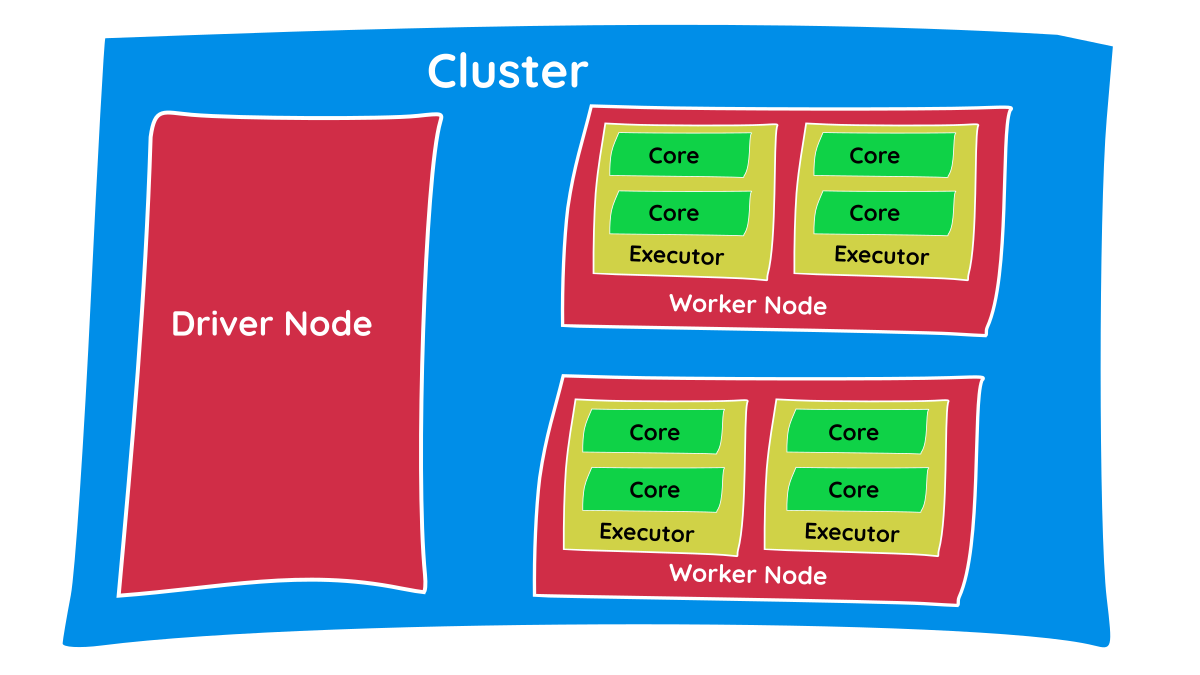
- Cluster: A cluster is a compute component. It simply means a group of computers, also called nodes and in most cases, these are Virtual Machines (VMs). If you consider your laptop for compute, it can be called a single-node cluster.
- Nodes: A single computer in a cluster. There are primarily two types of nodes: the master/driver node and the worker node. We’ll see the significance of each in coming sections.
- CPU: The physical hardware brain of each node. While provisioning the nodes, we can configure CPU specs that dictate how fast the node can process tasks.
- Core: An independent processing unit in a CPU. Today’s CPUs have multiple cores. Each core can perform tasks parallelly in an isolated manner, so the number of cores decides the concurrency and degree of parallelism.
- Memory/RAM: Temporary, volatile storage on the CPU. Since Spark is an ‘in-memory processing’ engine, it tends to store as much data as possible in memory instead of reading/writing to disks, which is slower.
- Executor: This is a JVM (Java Virtual Machine) process launched on worker nodes. Executors are responsible for processing the tasks assigned by the driver and storing data intermittently in its allocated memory. You can allocate a specific number of cores and memory to an executor.
Note: Cluster, Node, CPU, and Core are all generic hardware terms and exist physically on the hardware. An Executor, however, is a Spark-specific software concept, meaning the number of executors can be configured right in your Spark code, as shown below:
from pyspark.sql import SparkSession

# Initialize the SparkSession with specific executor configurations
spark = SparkSession.builder \
    .appName("datawarehouse_blog_processing") \
    .config("spark.executor.instances", "4") \
    .config("spark.executor.cores", "4") \
    .config("spark.executor.memory", "8g") \
    .config("spark.driver.memory", "4g") \
    .getOrCreate()
Having a cluster makes it possible for Spark to process data in a distributed manner, making it incredibly fast.
The Classroom Analogy: Distributed Processing
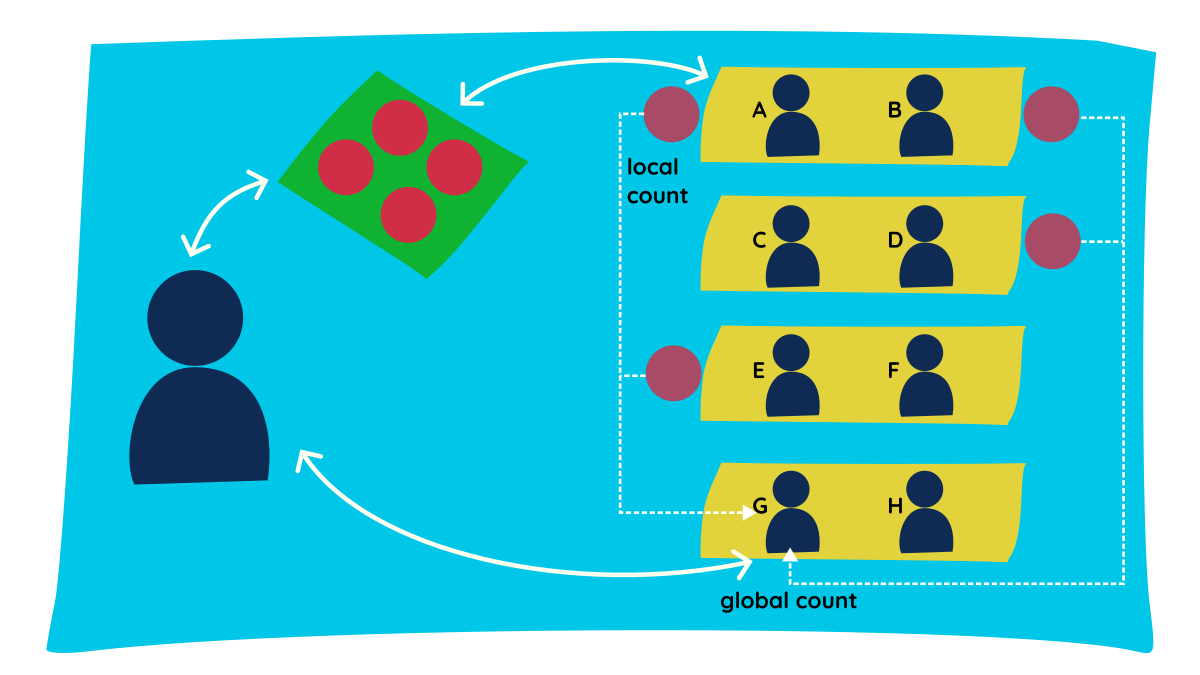
Let's try to understand the distributed processing nature of Spark through a simple classroom analogy.
- Consider a classroom with an instructor and a few students. The instructor has four pouches of marbles, and the goal is to count the total marbles in all pouches.
- The instructor gives one pouch each to students A, B, D, and E, and asks them to count the marbles inside.
- Each student reports their count - this is called the local count.
- The instructor also needs the total count, so they ask student G to get the grand total.
- We did the count in two processes:
local count-shuffle-global count. - In between these two stages, we had a shuffle stage. Student G went and collected values from all groups, so the data was shuffled between groups; essentially, the data was moved and persisted across the network.
This is the essence of how Spark works. (Analogies: Instructor = Driver, Students = Executors, Pouch = Partition, Counting = Task).
Essential Spark Concepts You Need to Know
- Partition: To allow every executor to work in parallel, Spark breaks down the data into chunks called partitions. From our classroom analogy, the pouches containing marbles can be considered partitions.
- Transformation: An instruction or code to modify and transform data is known as a transformation (e.g.,
SELECT,GROUPBY). Transformations help Spark build a logical plan of execution. There are two types of transformations: narrow & wide. You can find a deeper dive on them in my previous post here. - Action: To actually trigger the execution of code, we need to call an action, which executes the logical plan created by the transformations. Examples include
.show(),.count(), or.write(). - Shuffle: The process of redistributing or moving data across different partitions (and often across different worker nodes over the network) to group it together.
- Lazy Evaluation: Spark prefers lazy evaluation, meaning it waits until the absolute last minute to execute the graph of computation (the logical plan). It only runs when an action is called. This allows Spark to optimize the execution plan and use resources efficiently.
Key Components of the Spark Processing Engine
The Spark Driver
The master node (process) in a driver coordinates workers and oversees the tasks. Spark is split into jobs and schedules to be executed on executors on the cluster. Spark contexts (gateways) are created by the driver to monitor the job working in a specific cluster/node and to connect to the Spark cluster. The driver program calls the main application and creates the Spark context. Everything is executed using this context.
Each Spark session has an entry in the Spark context. Context acquires worker nodes to execute and store data as Spark clusters are connected to different types of cluster managers. When a process is executed in the cluster, the job is divided into stages, and those stages are broken down into scheduled tasks.
The Spark Executors
The executor is responsible for executing a job and storing the data in cache. Executors first register with the driver program at the beginning. These executors have a number of slots to run applications concurrently. The executor runs the task when it has loaded the data, and they are removed in idle mode. Executors are allocated dynamically and constantly added or removed during the execution of tasks. A driver program monitors the executors during their performance.
Worker Nodes
The slave nodes function as homes for executors, processing tasks, and returning the results back to the Spark context. The master node issues tasks, and the worker node executes them. They make the process simpler by handling as many jobs as possible in parallel by dividing the job up into sub-jobs on multiple machines. In Spark, a partition is a unit of work and is assigned to one executor core.
The Cluster Manager
The cluster manager acts as an external service that coordinates resources across the physical machines. It is responsible for acquiring the worker nodes and allocating the required memory and CPU cores for the executors. When the driver program connects to the cluster, it communicates with the cluster manager to request these resources before a job can begin.
The cluster manager oversees the available capacity but does not execute the user's tasks itself. Once it allocates the executors on the worker nodes, the cluster manager steps back, and the driver directly monitors the job. Spark is designed to be pluggable, meaning it can be connected to different types of cluster managers (YARN, Kubernetes, Mesos, or Spark Standalone). Ultimately, the cluster manager simply ensures the Spark application has the physical hardware to run concurrently.
The Execution Flow: How a Job Actually Runs
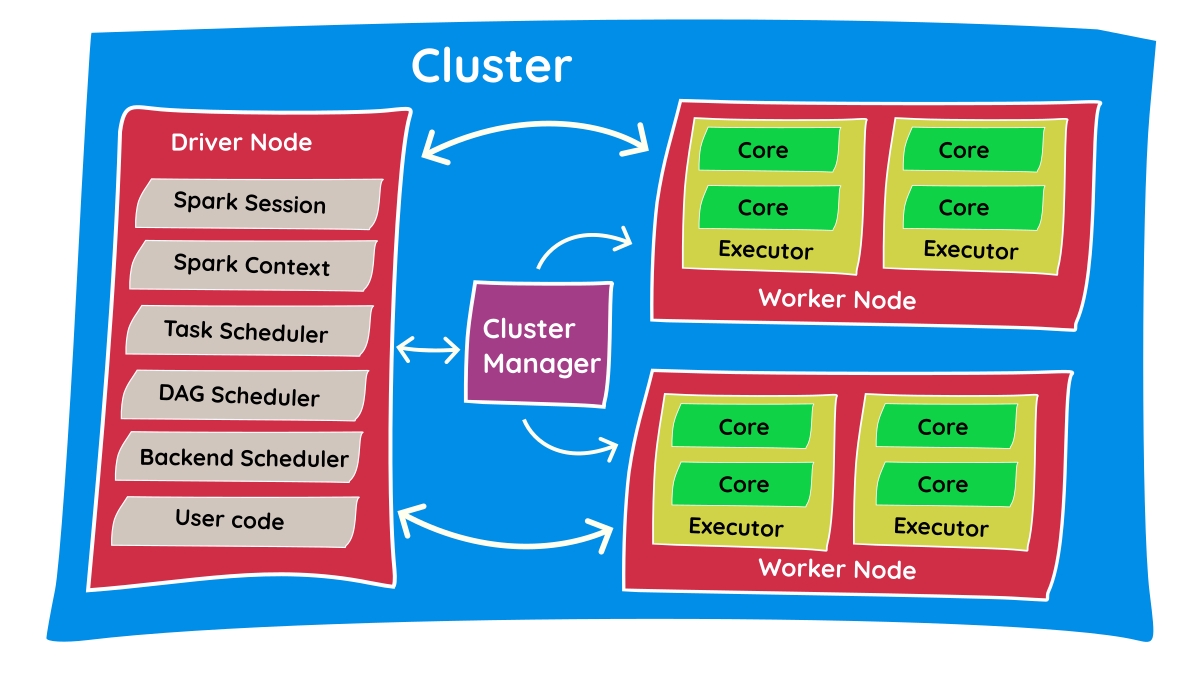
- The Spark Session is the entry point for your Spark program/code.
- After submitting the code, the Spark Session connects with the Resource Manager and asks it for the required resources (e.g., asking for 4 executors with 2 cores each).
- The Resource Manager contacts the cluster and creates the required executors. Once resources are allocated, it reports back to the Spark Session.
- Now, the driver program starts connecting with executors to execute code. First, it copies the Python program to all of the executors and instructs them on the tasks they need to perform.
- Executors perform these tasks and report back to the driver program with results.
- Depending on the success or failure of tasks, the driver program communicates with the resource manager to shut down the allocated resources.
Interview Questions you can answer after this
Because understanding the internal architecture separates junior developers from senior engineers, these concepts are heavily tested in data engineering interviews. By mastering this material, you can confidently answer questions like:
- "What is the difference between a Driver and an Executor?"
- "Why does Spark use Lazy Evaluation, and how does it benefit performance?"
- "Can you explain what happens behind the scenes when you call a transformation versus an action?"
TL;DR / Summary
At its core, Apache Spark is a master-slave architecture designed to divide and conquer massive datasets.
The entire process in a nutshell:
- You write your code and trigger an Action.
- The Driver (the brain) translates your code into a logical execution plan.
- The Cluster Manager finds the necessary hardware (Worker Nodes).
- The Driver splits your data into chunks (Partitions) and assigns them to Executors living on the Worker Nodes.
- The Executors process the data in parallel across multiple Cores and return the final result back to the Driver.
Understanding this flow is the first step to mastering distributed data systems.